


The Short Answer on PlayStation Support
If you landed here wondering whether Delta Force is on PlayStation, the answer is yes. The game is live on PS5 as a free-to-play tactical shooter, and it has its own dedicated listing on the PlayStation Store with add-ons already available for purchase.
Delta Force is confirmed and available on PS5 as a free-to-play title. The game launched on console on August 19, 2025, and can be downloaded directly from the PlayStation Store.
That said, a quick yes-or-no only gets you so far. Plenty of players still run into confusion because official information is spread across multiple pages, and not every detail lines up at first glance. This guide pulls together the publisher announcement, the PlayStation game page, and the live store listing so you can skip the guesswork entirely.
Is Delta Force on PlayStation Right Now
Yes. Delta Force is on PS5 right now. The official publisher announcement confirmed the console version launch for August 19, 2025, and the game has been downloadable on the PlayStation Store since that date. If you were searching for when is delta force coming to PS5, that window has already passed. It is live and playable.
What Is Confirmed for PS5 and Console Players
The PlayStation game page lists Delta Force as a free-to-play title rated ESRB Teen, complete with a console launch trailer and a full set of accessibility features. The store listing mirrors this with multiple add-on packs and user reviews already posted. Here is a quick breakdown of where things stand for console players:
- Confirmed: PS5 availability, free-to-play base game, add-ons live on the store, ESRB Teen rating
- Available but worth verifying regionally: Store listing visibility and download access can vary by PSN region, so your local store page may look slightly different
- Not yet clarified on official pages: PS4 support, specific cross-play details, and cross-progression scope between platforms
How This Guide Uses Official Sources
Every claim in this article traces back to one of three source types: the publisher's own announcement on playdeltaforce.com, the PlayStation game page, or the PlayStation Store product listing. Where those sources leave gaps, we say so directly rather than filling in assumptions. The goal is to give you a single, reliable reference instead of making you cross-check three different pages on your own.
The real complexity starts when you try to figure out exactly which hardware is supported, how the free-to-play model works on console, and whether your progress carries over from another platform. Each of those questions pulls from different parts of the official ecosystem, and that is exactly what the rest of this guide breaks down.

How Official Sources Confirm the Delta Force Console Release
Three separate pages carry the information most players need, but each one serves a different purpose. Treating them interchangeably is where confusion creeps in. A publisher announcement, a PlayStation game page, and a live store listing all confirm different slices of the picture. Knowing which page answers which question saves you from misreading a marketing trailer as proof of download availability, or mistaking a game page for a working download link.
What the Publisher Announcement Confirms
The publisher's own site, playdeltaforce.com, is where the delta force console release was first made official. This is the source that locked in the launch date, named the supported platforms, and outlined the broad strokes of what console players could expect. It is the right place to verify intent and timeline. What it typically does not cover in detail is region-specific store behavior, exact add-on pricing, or ESRB metadata. Think of it as the "what and when" source, not the "how to download right now" source.
What the PlayStation Game Page Adds
The PlayStation game page fills in the platform-specific details the publisher page leaves out. This is where you find the ESRB Teen rating badge, the full list of accessibility features, screenshots running on console hardware, and a description of the game's three modes: Warfare, Operations, and Black Hawk Down. For anyone researching the delta force playstation 5 store release date, this page acts as a bridge. It confirms the game exists within the PlayStation ecosystem and links out to the actual storefront. It does not, however, always reflect real-time download status in every PSN region.
Why the Store Listing Matters Most for Download Status
The PlayStation Store listing is the only page that proves you can actually download the game right now. It shows the live product entry, displays available add-ons, includes player ratings and reviews, and reflects the current free-to-play label. If you want to confirm the delta force console release date ps5 in a way that goes beyond announcements and marketing pages, this is where you look. A store listing with user reviews and purchasable add-ons is the strongest signal that the game is not just announced but actively available.
Here is how these three sources compare side by side:

The key takeaway: release messaging, platform branding, and actual store availability often live in different places. A headline confirming the delta force playstation 5 store listing does not automatically mean every region sees the same download button on the same day. Each source fills a gap the others leave open, and reading them together gives you the full picture rather than a partial one.
That layered structure also explains why so many players struggle to pin down exactly what has been confirmed versus what is still ambiguous, especially around specific dates, hardware generations, and regional rollout timing.
What Is Confirmed About the Delta Force Console Release Date
Knowing that three official sources exist is useful, but the real question most players are trying to answer is simpler: what is actually locked in, and what is still up in the air? Mixing up confirmed details with assumptions is easy when announcements use broad language and store pages vary by region. Breaking the two apart makes the difference between downloading the game tonight and refreshing a store page that does not apply to you yet.
What Is Confirmed About the Console Release
The delta force console release date is not a mystery. The publisher confirmed August 19, 2025, as the PS5 launch date, and the PlayStation Store listing backs that up with live user reviews, add-on packs, and a working free-to-play download button. Here is what you can treat as verified:
- PS5 launch date: August 19, 2025, confirmed by the publisher and reflected on the store
- Free-to-play base game available for download on PS5
- Multiple add-on packs already listed and purchasable
- ESRB Teen rating displayed on the PlayStation game page
- Three core modes (Warfare, Operations, Black Hawk Down) included at launch
For anyone still asking when is delta force coming to console, the short version is that it already arrived. The delta force ps5 release date is not a future window or a tentative target. It is a past event with a live storefront to prove it.
What the PS5 Release Date Signals Mean
A confirmed release date paired with an active store listing is the strongest signal a console player can get. It means the game has cleared platform certification, passed ESRB review, and entered the PlayStation ecosystem as a downloadable product. The delta force hawk ops ps5 release date aligns with the broader console rollout the publisher announced, and the presence of user-generated reviews on the store page confirms real players have been accessing it since launch day.
That said, a confirmed date does not guarantee identical rollout everywhere. Store pages update on different schedules depending on your PSN region, and some territories may see the listing go live hours or even days apart. The date itself is solid. The exact moment it appears in your local store is a separate variable.
What Is Still Unclear on Official Pages
Even with a firm launch date and a working store listing, several details remain unaddressed across all three official sources. These are the gaps where assumptions tend to fill in for facts:
- PS4 support: no official page confirms or denies whether the game runs on last-generation hardware
- Regional rollout timing: the US store listing is live, but availability in every PSN territory is not explicitly documented
- Cross-play scope: whether PS5 players match with PC or mobile users is not stated clearly on the game page or store listing
- Cross-progression details: no official source confirms whether progress transfers between platforms
- Future content roadmap for console: post-launch plans specific to PS5 are not outlined on any current page
Do not assume regional availability, PS4 backward compatibility, or cross-platform progress sharing unless the official store metadata in your region explicitly confirms it. Announcement language and live store behavior are not the same thing.
The distinction matters because when does delta force come out on console is a different question depending on where you live and what hardware you own. The release itself is confirmed. Whether every detail applies to your specific setup requires checking the store page directly rather than relying on a headline.
That hardware question, specifically whether PlayStation support means PS5 only or extends to PS4, is one of the biggest gaps in the current official messaging and deserves a closer look on its own.
Which PlayStation Hardware Can Run Delta Force
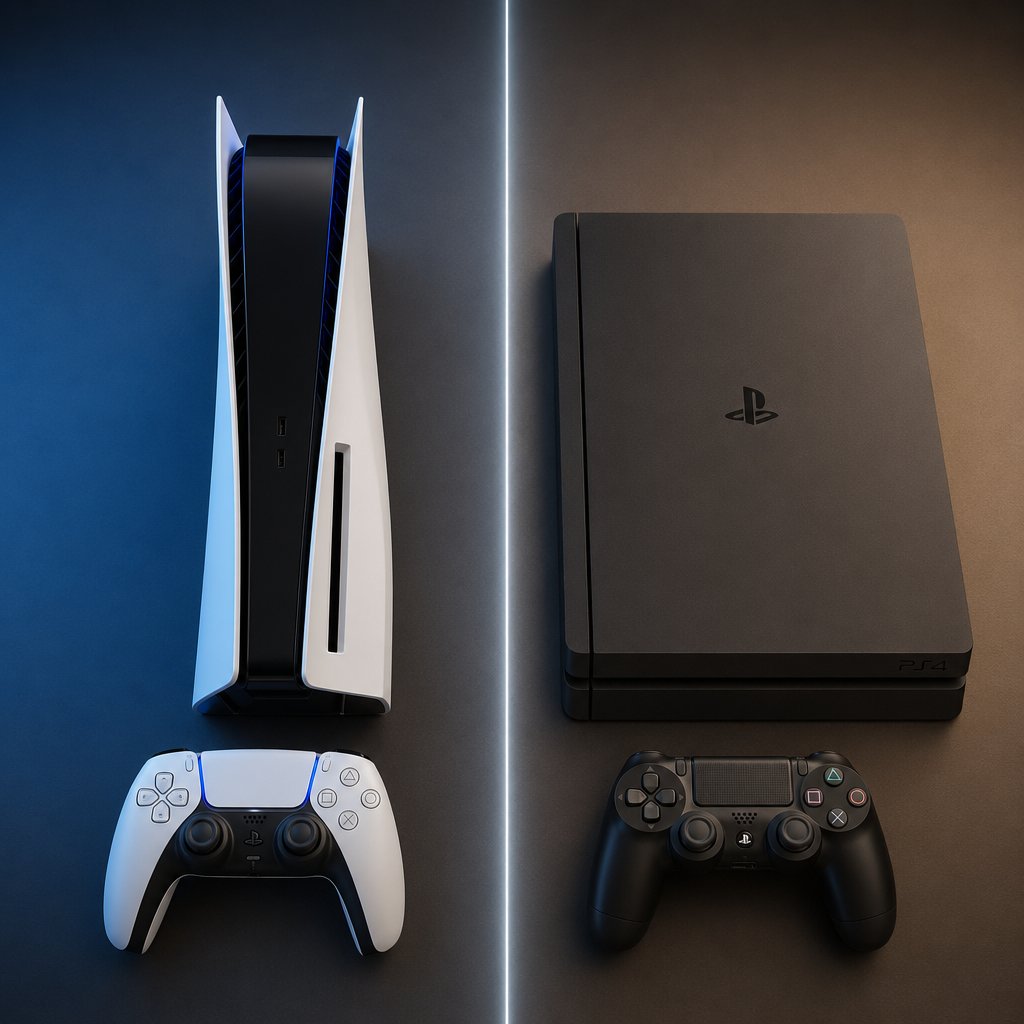
Headlines that say "PlayStation" without specifying a generation create a real problem. A PS5 owner reads that and assumes they are covered. A PS4 owner reads the same headline and makes the exact same assumption. Only one of them is right. Sorting out which hardware actually runs Delta Force comes down to reading the store listing carefully rather than trusting vague platform labels.
PS5 Support Versus PS4 Support
Can you play Delta Force on PS5? Yes, without question. The PlayStation Store listing is a PS5-native product. The product ID itself carries the "PPSA" prefix, which Sony uses exclusively for PS5 titles. The game also references DualSense-specific features like adaptive trigger effects and haptic feedback toggles in its accessibility options, both of which are PS5 hardware capabilities that do not exist on PS4.
So is Delta Force on PS4? Based on every available official source, no. There is no PS4 product listing, no "CUSA" prefix variant (Sony's identifier for PS4 games), and no mention of PS4 compatibility anywhere on the game page or store entry. If you are still on last-gen hardware, the current evidence points to PS5 only.
How to Read a PlayStation Store Platform Label
The PlayStation Store does not always make generation support obvious at a glance. Some games list "PS4 & PS5" in their platform tags. Others show only one generation. The fastest way to tell is to look for two things: the product ID prefix and the platform compatibility line on the store page itself.
- "PPSA" prefix = PS5-native title
- "CUSA" prefix = PS4 title (which may also run on PS5 through backward compatibility)
- Dual listing with both prefixes = the game supports both generations
Delta Force carries only a PPSA identifier. No dual listing exists. That is a clear signal that the game was built for PS5 and is not being offered as a cross-generation product.
Why Backward Compatibility Should Not Be Assumed
Sony's backward compatibility support page confirms that the PS5 can play the overwhelming majority of PS4 games. That is a one-way street, though. It means PS4 games run on PS5 hardware, not that PS5 games run on PS4. A PS5-native title like Delta Force does not automatically work on older hardware just because the two consoles share an ecosystem. Can you play Delta Force on PS4? Not unless the publisher releases a separate PS4 version, and nothing in the current official materials suggests that is planned.
Here is a quick reference to keep the hardware picture straight:

The bottom line: will Delta Force be on PS5 is already answered. It is there. Whether it will ever reach PS4 is a separate question that no official source has addressed. Until a CUSA listing or a publisher statement says otherwise, PS5 is the only PlayStation hardware in the picture.
With the hardware question settled, the next thing worth understanding is what "free to play" actually means once you open the store page and see add-on packs listed alongside the base download.
How the Free-to-Play Store Model and Add-Ons Work
Seeing a row of purchasable add-on packs right next to a free download button raises an obvious question: is Delta Force free on PS5, or is there a catch buried in the store page? The short answer is that the base game costs nothing. The longer answer involves understanding what "free to play" actually covers and where optional spending begins.
How Free-to-Play Access Usually Works
On PlayStation, a free-to-play title lets you download and play the core game without paying anything upfront. There is no trial period, no paywall after a certain level, and no mandatory purchase to unlock modes. The Delta Force store listing carries the "F2P" label directly in its title, and the game description explicitly states a commitment to no pay-to-win mechanics. So is Delta Force free to play on PS5? Yes. All three core modes, Warfare, Operations, and Black Hawk Down, are included in the base download at no cost. The delta force ps5 price for the base experience is zero.
What Store Listings Reveal About Add-Ons
The store page tells a fuller story once you scroll past the download button. Delta Force's PlayStation Store listing already shows multiple add-on packs available for purchase. The reference material confirms over a dozen separate add-on entries, though specific pack names and individual prices are best verified directly on the store page since they can change with seasonal updates or new content drops. These add-ons typically cover cosmetic items, in-game currency bundles, or themed packs rather than gameplay advantages, which aligns with the publisher's no pay-to-win stance.
How to Interpret Buying Options Without Guessing
Store language can be misleading if you are not used to how PlayStation categorizes products. A page showing buying options for Delta Force: Hawk Ops does not mean the base game has a price tag. Free-to-play titles list add-ons and optional packs as purchasable items while keeping the core download separate and free. If you see a dollar amount on the store page, it applies to a specific add-on, not the game itself.
Here is a breakdown of how each store category works:

A delta force pre order pack, for example, would only be relevant if it still appears as a live listing. Post-launch, these packs are often replaced by seasonal alternatives. The safest approach is to treat the store page as a living document: what you see today reflects what is available today, not what was offered at launch or what might arrive next month.
Understanding the payment model clears up one layer of confusion, but it also raises a related question. If the game is free and available across multiple platforms, does your progress follow you between them? That depends on cross-play and account-linking support, which is a separate set of details worth checking on its own.

What to Expect From Delta Force PS5 Crossplay and Progress
A free-to-play game available on PC, console, and mobile naturally leads to one question: can everyone play together, and does your progress follow you across devices? These are two separate features with different answers, and mixing them up is one of the fastest ways to lose unlocks or end up in lobbies you did not expect.
What Crossplay Means for Delta Force on PS5
Delta Force PS5 crossplay is live. PS5 players share lobbies with Xbox Series X/S and PC players by default. The game also gives console players a toggle to opt out of PC matchmaking entirely. You will find it under the Game tab in Settings, right at the top. Turning it off restricts your matches to other console players only, which is a popular choice for anyone who would rather avoid the mouse-and-keyboard crowd in Operations mode.
Mobile is a different story. Delta Force is available on iOS and Android, but mobile players exist in their own matchmaking pool. They cannot queue into PC or console lobbies, and console players will not encounter them regardless of how the crossplay toggle is set. So if you are wondering when is delta force coming to mobile in a way that connects to your PS5 experience, the answer is that mobile already exists as its own separate ecosystem.
How Cross Progression and Account Linking Differ
Crossplay determines who you play with. Cross-progression determines whether your skins, Operators, and unlocks travel with you between devices. They are not the same system.
Cross-progression in Delta Force runs through a Level Infinite Pass (LIPASS) account. Link your LIPASS to your PSN, Steam, or other third-party accounts, and your progress syncs across every platform tied to that account. Every Operator you have unlocked, every cosmetic you have earned, all of it carries over as long as the accounts are properly linked.
There is a critical catch, though. If you already logged into the mobile version with a separate account before linking it to your LIPASS, the game will not merge that progress. The sync only works when the LIPASS account is connected from the start. Retroactive merging is not supported.
What Players Should Verify Before Moving Progress
Before assuming your unlocks will appear on a new platform, check three things: that you have a LIPASS account, that it is linked to the platform account you plan to use, and that you did not already create orphaned progress on the destination device. Skipping any of those steps risks starting from scratch on a platform where you expected to pick up where you left off.
Here is how each feature breaks down across the Delta Force: Hawk Ops platforms:

The pattern here is consistent: features that are live tend to be well-documented in the game's own menus and on the publisher's site. Features that are absent or limited, like mobile crossplay or retroactive progress merging, are confirmed by their absence rather than by an explicit "no" on an official page. When in doubt, check the LIPASS account center and your in-game Settings before your first match on a new platform.
All of this information lives across different menus, store pages, and support articles. Pulling it together into a single verification process, one you can follow step by step before you even hit the download button, makes the whole experience far less frustrating.
How to Verify if Delta Force Is Available on PS5 Before You Download
Scattered details across menus, store pages, and support articles are one thing. Having a repeatable process you can run through in under five minutes is something else entirely. Whether you are checking Delta Force specifically or any future PSN release, the same verification sequence applies. Start broad, narrow down, and only hit the download button once every layer checks out.
How to Check the Publisher Announcement First
Your first stop should always be the publisher's own site. For Delta Force, that means playdeltaforce.com. Look for a formal announcement that names the platform, states a date, and describes what is included. This confirms intent. It does not confirm that the game is sitting in your store right now, but it tells you whether a console version was ever officially greenlit in the first place.
How to Use the PlayStation Game Page for Platform Metadata
The PlayStation game page is your second checkpoint. This is where you verify platform-specific metadata: the ESRB rating, the hardware generation tag, accessibility details, and a link to the storefront. If the game page exists and lists PS5 as a supported platform, you are one step closer. If it only references a general "PlayStation" label without specifying PS5, pause and dig deeper before assuming anything about your hardware.
How to Confirm the Live Store Listing in Your Region
The final and most important step is the live store listing itself. Search for "Delta Force" directly on your PS5 console or through the PlayStation Store web portal while signed into your regional PSN account. A live listing with a download button, user reviews, and add-on packs means the game is available in your territory. No listing, or a page that only shows "notify me," means your region may not have it yet.
Here is the full verification sequence in order:
- Check the publisher announcement on playdeltaforce.com to confirm the console release date and platform support
- Visit the PlayStation game page to verify PS5 metadata, ESRB rating, and a direct store link
- Search the PlayStation Store from your own PSN account to confirm the listing is live in your region
- Note any delta force ps5 release time details if the store page or publisher site mentions a specific update window. PSN store updates typically roll out between 2 PM and 6 PM EST in North America, with European and Asian regions following on different days
Even with a clean process, a few mistakes trip people up repeatedly. Watch out for these:
- Relying on social media posts or influencer clips as proof of availability instead of checking the actual store listing on your own account
- Confusing the PlayStation game page, which is an informational hub, with the delta force PSN store listing, which is the actual download source
- Assuming PSN availability is identical across all regions. Store rollouts can differ by hours or even days depending on territory
- Treating a "coming soon" placeholder as confirmation that the game is downloadable right now
Running through these four steps takes less time than scrolling through a Reddit thread full of conflicting answers. And once you have confirmed the listing is live and the download is ready, the only question left is what to do after you start playing.

Smart Next Steps After You Decide to Play
You have confirmed the listing, checked your hardware, and verified your region. The download is ready. What comes next depends on how deep you want to go once Delta Force: Hawk Ops PS5 is actually running on your console.
What to Do After You Confirm Delta Force on PlayStation
Since Delta Force free PS5 access covers all three core modes out of the box, there is no rush to spend anything. Start by playing through the Black Hawk Down campaign, testing Warfare lobbies, and running a few Operations extractions. Get a feel for the Operators, the weapon handling, and the progression system before you even think about optional purchases. A simple action flow looks like this:
- Download the base game from the PlayStation Store and confirm it launches on your PS5
- Link your LIPASS account early so cross-progression is active from day one
- Play enough matches to understand which modes, Operators, and cosmetics matter to you
- Review the official add-ons listed on the store page to see what seasonal packs or bundles are currently available
- Decide whether topping up Delta Coins fits your playstyle before committing any money
Where to Check Official Purchases and Add-Ons
The buying options for Delta Force Hawk Ops live directly on the PlayStation Store under the game's add-on section. Seasonal battle passes, cosmetic bundles, and Delta Coin packs rotate with each content update, so what you see today may not match what was listed at launch. Always check the store page on your own PSN account for current pricing rather than relying on outdated screenshots or third-party lists.
When a Top-Up Resource Becomes Useful
Once you know which cosmetics or battle pass tiers you want, purchasing Delta Coins through a dedicated top-up platform can simplify the process. VeloxGame's Delta Force Top Up page, for example, lets you buy coins using your Player ID without logging into your game account directly. It supports Delta Force on PlayStation alongside PC and mobile, and coins are tied to your account rather than your device. For players on Delta Force PlayStation 5 who have already decided to invest in skins, seasonal passes, or market items, a trusted top-up resource keeps the transaction quick and separate from the console storefront.
The entire journey, from confirming platform support to making your first optional purchase, works best when each step builds on verified information rather than assumptions. That is exactly what this guide was built to provide.
Frequently Asked Questions About Delta Force on PlayStation
1. Is Delta Force available on PS5 right now?
Delta Force launched on PS5 on August 19, 2025, as a free-to-play tactical shooter. The game is fully downloadable from the PlayStation Store with all three core modes, Warfare, Operations, and Black Hawk Down, included at no cost. Multiple add-on packs are also live on the storefront. To confirm availability in your specific region, search for Delta Force directly on your PS5 console or through the PlayStation Store web portal while signed into your PSN account.
2. Can you play Delta Force on PS4?
Based on all currently available official sources, Delta Force does not support PS4. The PlayStation Store listing carries a PPSA product ID prefix, which Sony reserves exclusively for PS5-native titles. There is no separate CUSA listing (Sony's PS4 identifier) and no mention of PS4 compatibility on the game page or store entry. Sony's backward compatibility only allows PS4 games to run on PS5, not the other way around, so a PS5-only title will not work on last-gen hardware unless the publisher releases a dedicated PS4 version.
3. Does Delta Force on PS5 support crossplay with PC and Xbox?
Yes, Delta Force PS5 crossplay is active. PS5 players share lobbies with Xbox Series X/S and PC players by default. Console players also have the option to disable PC matchmaking through a toggle found under the Game tab in Settings, restricting matches to console-only lobbies. Mobile players, however, exist in a completely separate matchmaking pool and cannot join PC or console sessions regardless of crossplay settings.
4. Is Delta Force really free to play on PlayStation 5?
The base game is entirely free. Delta Force carries the F2P label on its PlayStation Store listing, and all three gameplay modes are accessible without any upfront payment or time-gated trial. Optional spending exists through add-on packs, cosmetic bundles, and Delta Coin purchases, but the publisher has stated a commitment to no pay-to-win mechanics. Players looking to purchase Delta Coins can do so through the PlayStation Store or through dedicated top-up platforms like VELOX's Delta Force Top Up page, which supports transactions via Player ID across PS5, PC, and mobile.
5. Does progress in Delta Force carry over between PS5 and other platforms?
Cross-progression is supported through a Level Infinite Pass (LIPASS) account. Once you link your LIPASS to your PSN, Steam, or other platform accounts, Operators, cosmetics, and unlocks sync across all connected devices. The key requirement is that the LIPASS account must be linked before you start playing on a new platform. If you already created progress on a device using a separate login before connecting it to your LIPASS, that orphaned progress cannot be merged retroactively.





